

EN
DppMCA
DppMCA is a software package that provides data collection, display of the work process and control signals received from the detector board. This software is in the public domain. The program is compatible only with FW6 devices.
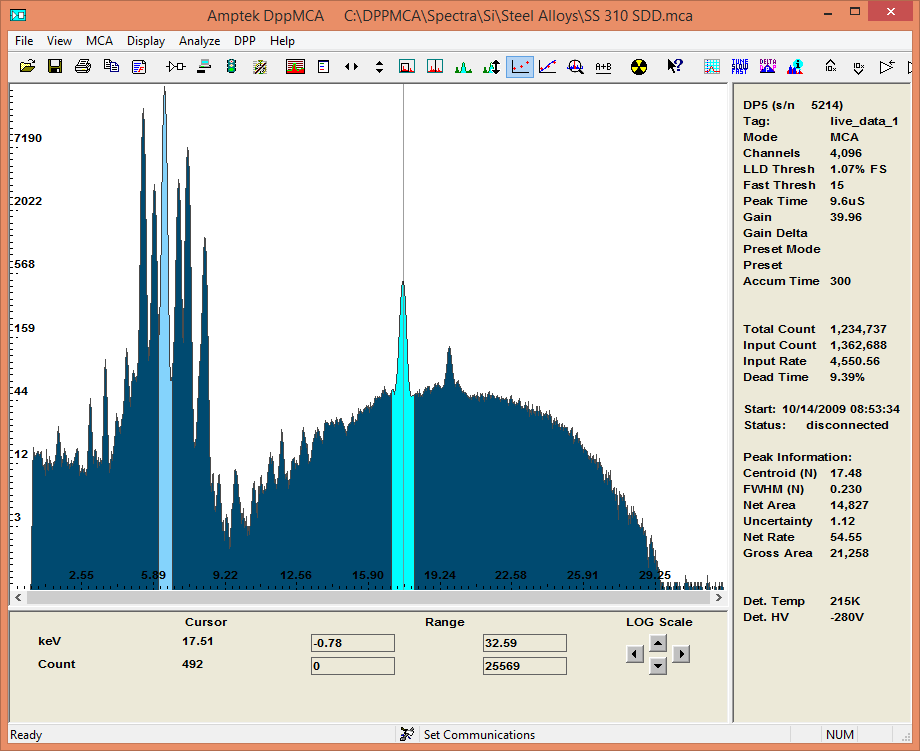
Peculiarities:
1) Full control of all hardware functions of the device, namely:
- Several options of factory (initial) settings for different configurations and conditions of detector use.
- Gain, peak rise time, detector temperature indicator, choice of number of analyzer channels and much more.
- Display of a set of spectrum in real time with many options allowing to control this process. Linear, logarithmic display, vertical and horizontal scaling, manual or automatic range switching.
2) Possibility of saving spectra.
- Energy calibration for spectral analysis, establishing areas of interest, various processing of these areas, spectrum smoothing, spectrum summation, etc.
- Additional software package for performing quantitative analysis using the fundamental parameters method (can be purchased separately).
- Supports Microsoft Windows XP, Vista, and Windows 7.
Hardware settings
Configuration of hardware settings is available after pressing the button «Acquisition Setup» located on the main window of the program. To change the factory settings, the number of channels, the threshold, you need to open the tab «MCA», the tab «Shaping» contains such parameters as – peak rise time, pile-up deviation. For convenience, the settings can be saved in files with the extension .cfg to simplify subsequent operation of the detector.
Display and User Interface:
All functions are accessible via the command menu located on the main program window. The control panel also contains hot keys, such as: start and stop of the spectrum acquisition process, buttons responsible for scaling, setting areas of interest, and much more.
Spectrum Analysis:
The user sets the regions of interest and specifies the desired peak processing. Very easy calibration using two points with known energies.
All you need to do to use the program is to unpack the archive containing the software (the archive is available on the company's website) into the working directory. Connect the detector to the PC using the RS-232, Ethernet, USB interface of your choice, then run the program, which in turn should detect the connected detector board.
Change gain, full energy scale:
The main purpose of this function is to change the energy scale, i.e. adjust the energy range to the corresponding experiment or detector operation process. The lowest gain corresponds to the highest energy value, and vice versa. For example, if the full gain of x100 corresponds to the energy scale range of 15 keV, then the gain of x50 will correspond to the full energy scale of 30 keV.

Calibration:
To perform calibration, it is necessary to select two peaks with known energy, while the distance between them should not be less than half the energy scale. Then click the “Calibrate” button. Place the vertical cursor in the corresponding peaks and add them and the dialog box using the Add button. Select the required peak processing option and then click the Ok button. Calibration is complete.


